

Allocators
An Allocator is a managed game server allocation service provisioned and operated by GameFabric. It acts as the central broker between game servers and matchmakers:
- Game servers register themselves with the Allocator's Registry endpoint when they become ready.
- Matchmakers and backends call the Allocator's Allocation endpoint to request an available server for a player session.
Allocators are global resources — they are not scoped to a specific Environment. They are read-only in the UI; provisioning and decommissioning is handled by the platform operator through your provisioning system.
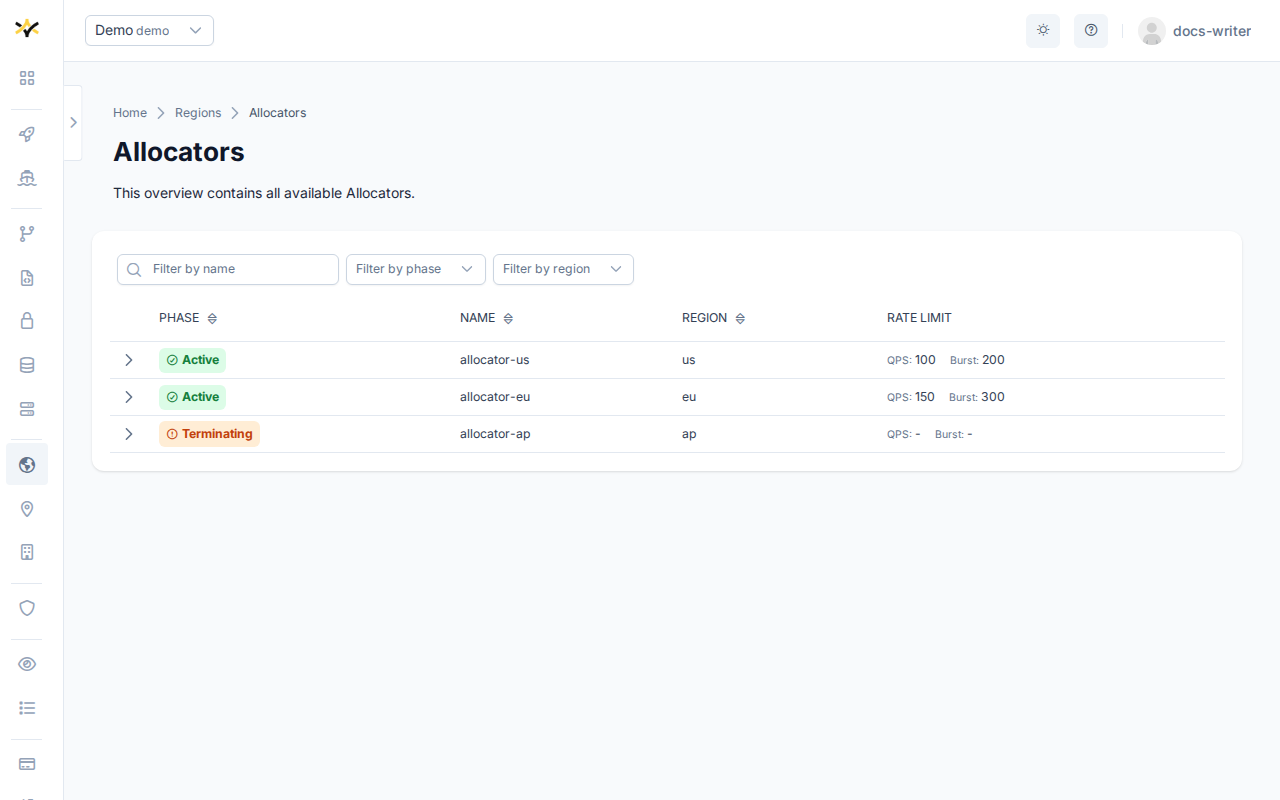
The region field
Every Allocator has a spec.region field. This is a plain string — an opaque label set at provisioning time — that identifies where the allocator operates. It is not a reference to a GameFabric Region object.
This distinction matters: the allocator's region string and the name of the GameFabric Region you attach it to are two independent values. They may be identical by convention, or they may differ. When game servers register with the Allocator, they advertise this string as their region. See Attaching an allocator to a Region and the Migration section for the implications.
Endpoints
Each Allocator exposes two endpoints, both visible when you expand a row on the Allocators page.
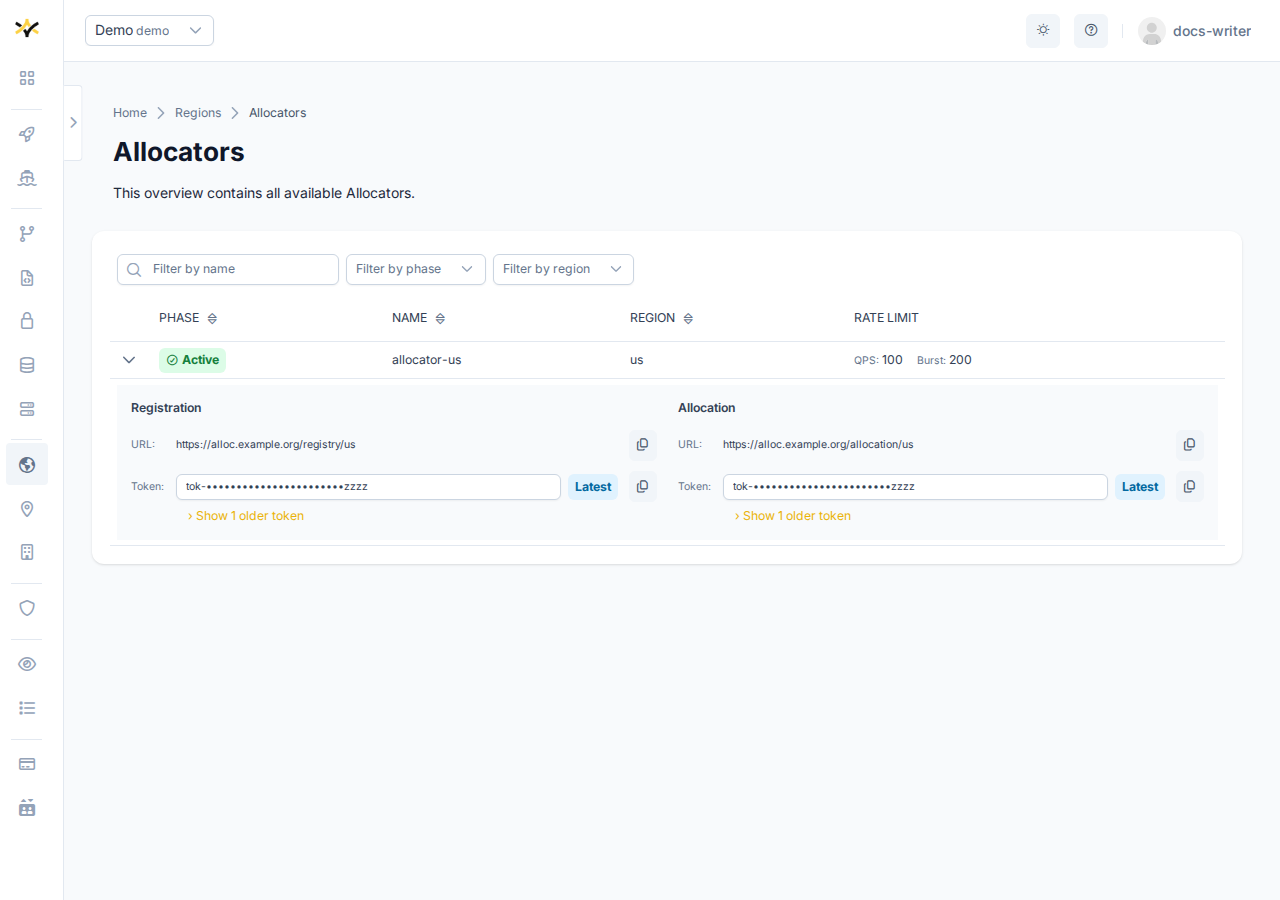
Registry
Game servers can use the Registry endpoint to register and deregister themselves. When the allocator is attached to a Region, GameFabric automatically injects the Registry endpoint URL (ALLOC_URL) and the latest registry token (ALLOC_TOKEN) as environment variables into every game server container scheduled in that Region. The game server must manually call the Registry endpoint to register itself or use the Allocation Sidecar to handle registration automatically.
Allocation
The Allocation endpoint and token are informational only and can be used by matchmakers or backends to allocate registered game servers.
Rotating tokens
Both endpoints maintain an ordered list of access tokens to allow zero-downtime token rotation. Always use the last token in the list. Older tokens are kept visible during the rotation window so that currently running game servers continue to authenticate without interruption.
Attaching an allocator to a Region
A GameFabric Region can reference one Allocator via its spec.allocator field. You set or change this in the General tab of the Region create wizard or the Region edit modal by selecting from the Allocator dropdown.
Only Allocators in the Active phase can be attached. An Allocator that is Terminating is rejected. The attachment can be cleared at any time by setting the field back to empty.
Automatic environment variable injection
When an Allocator is attached to a Region, GameFabric automatically injects the following environment variables into every game server container scheduled in that Region — across all ArmadaSets, Armadas, Formations, and Vessels — without any manual configuration:
| Variable | Value |
|---|---|
ALLOC_URL | Registry endpoint URL |
ALLOC_TOKEN | Latest registry token (last in the rotation list) |
ALLOC_REGION | The allocator's spec.region string |
ALLOC_PRIORITY | Index of the Region Type in which the game server runs (0 = first type, 1 = second, …) |
Allocation Sidecar
These variables are consumed by the Allocation Sidecar — a container that can be configured to run alongside your game server and handles registration and deregistration automatically.
- For an overview of what the Allocation Sidecar is and when to use it, see Sidecar Containers.
- For step-by-step configuration, see Automatically Registering Game Servers.
Override precedence
The same environment variable name may appear in multiple configuration layers. When that happens, the highest-precedence source wins:
| Precedence | Source | Example use case |
|---|---|---|
| Highest | Armada / Vessel env vars | Per-deployment overrides |
| High | Region Type template env vars | Type-level infrastructure context |
| Low | Allocator-injected env vars (ALLOC_*) | Automatic injection — see above |
| Lowest | Site template env vars | Platform-operator defaults |
This means that if you define ALLOC_REGION explicitly on a Region Type template, it overrides the value injected by the allocator. If you define it on an Armada or Vessel directly, it overrides the one from the Region Type or from the injected Allocator. See the Migration section for guidance on removing manual settings after enabling managed injection.
Rate limiting
Each Allocator can be configured with rate limits that apply to incoming allocation requests:
- QPS — maximum number of queries per second.
- Burst — maximum burst size permitted above the QPS limit.
Both values are visible in the Rate Limit column of the Allocators table and are based on your contract tier.
When a client exceeds the configured rate limit, the Allocator responds with HTTP 429 (Too Many Requests). The client should back off and retry after a short delay.
Phase lifecycle
| Phase | Meaning |
|---|---|
Active | The Allocator is operational and serving traffic. |
Terminating | The Allocator is being decommissioned. It cannot be attached to new Regions. |
Navigating to the Allocators page
The Allocators page is reached from the Regions overview via the Allocators summary card at the top of the page. The card shows the current count of Allocators and links to the full list.
Filtering
The Allocators table can be filtered by:
- Name — free-text search.
- Phase — multi-select (
Active,Terminating). - Region — multi-select by the allocator's
spec.regionstring.
Migrating from manual configuration
Previously, ALLOC_URL, ALLOC_TOKEN, and ALLOC_REGION were configured manually — either as environment variables on a Region Type template, or directly on individual Armadas, Vessels, or their containers. Attaching a managed Allocator to a Region replaces this manual workflow with automatic injection.
What changes?
The most important change is ALLOC_REGION.
When you configured this manually, the value was a string entirely under your control. With a managed Allocator, the value is derived from the allocator's spec.region field, which is set at provisioning time and is immutable. This value may or may not match the string your game servers have been using.
If the region string changes, game servers that registered under the new value will not be found by a matchmaker that still queries under the old value. Registrations are attributed to the region string in use at the time of registration.
Before enabling a managed allocator on an existing region
- Open the Allocators page and locate the allocator you intend to attach.
- Check the value in the Region column — this is the allocator's
spec.regionstring. - Compare it with the
ALLOC_REGIONvalue currently in use on your Region (check the Region Type template env vars and any Armada or Vessel overrides). - If the values differ, plan for the transition: game servers registered under the old string will not be discoverable under the new string until they re-register.
Test on a small or temporary region first
It is strongly recommended to enable the managed allocator on a newly created or low-traffic Region first. This gives you a safe environment to verify that the allocator's region string is correct for your setup — and that game servers register and are allocated correctly — before applying the change to production regions.
Enabling an allocator on an existing production region without verifying the region string may result in game servers registering under a different string than your matchmaker expects, causing allocation failures.
Removing manual configuration
Once you have verified that the managed allocator is injecting the correct values:
- Remove any manually set
ALLOC_URL,ALLOC_TOKEN, andALLOC_REGIONentries from Region Type templates. - Remove the same variables from any Armada or Vessel env vars that were carrying them.
Because manually set variables at the Armada/Vessel or Region Type level take precedence over allocator-injected values (see Override precedence), leaving them in place will silently shadow the managed values and defeat the purpose of the managed allocator.
Example
Suppose you have:
- An Allocator with
spec.region: "prod-us-east". - A GameFabric Region named
us-eastwith two types:baremetal(index 0) andcloud(index 1). - Previously, the Region Type template had:text
ALLOC_URL   = https://allocator.example.com/prod/us-east/servers
ALLOC_TOKEN = <your-registry-token>
ALLOC_REGION = us-east
After attaching the allocator to the us-east region:
ALLOC_URLis injected automatically from the allocator's Registry endpoint URL.ALLOC_TOKENis injected automatically (latest token from the rotation list).ALLOC_REGIONbecomes"prod-us-east"— the value from the allocator'sspec.region.ALLOC_PRIORITYis injected as0for game servers in thebaremetaltype and1for those in thecloudtype.
If your matchmaker was querying for servers in region "us-east" (the old manual value), it will no longer find servers that register under "prod-us-east". Verify this mismatch before switching, and update your matchmaker's region filter if necessary.
Once confirmed, remove the manual ALLOC_URL, ALLOC_TOKEN, and ALLOC_REGION entries from the Region Type template so that the managed values take effect.