

Armada replicas and buffer
An Armada can spin up one game server, thousands of game servers, or anything in between, including no game servers as the special case of Scaling Down. The number of game servers running in each Region Type is determined by the Replicas and Buffer settings:
- Minimum Replicas
- Maximum Replicas
- Buffer Size
When configured too high, it can lead to unnecessary costs, as game servers are running idle without players using them. When configured too low, such as if not enough Ready game servers are available in time, it can lead to a poor matchmaking experience for players.
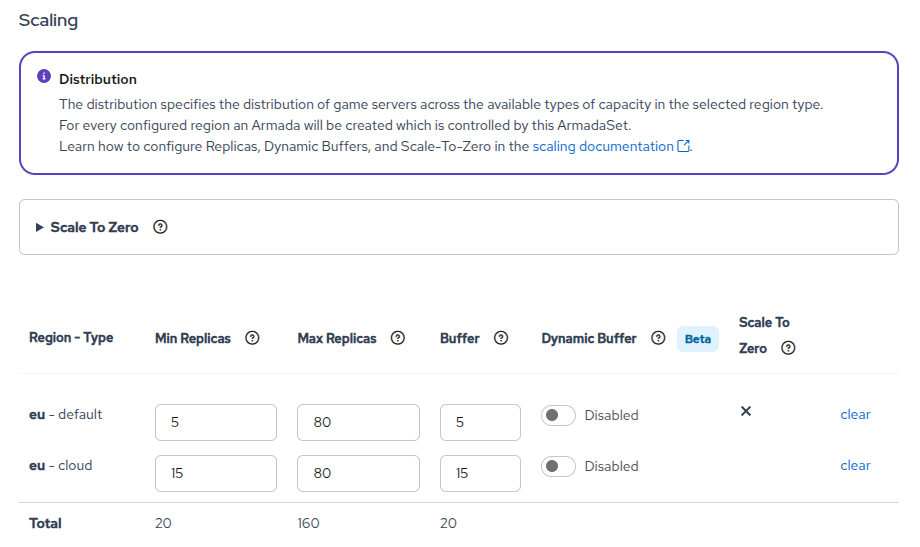
Minimum/maximum replicas
Replicas are the number of game servers running in any given state, from Starting to Ready, from Allocated to Unhealthy, Shutdown or Error.
The Minimum Replicas setting keeps at least that many game servers running at all times, regardless of their state. When the count falls below the minimum — for example, as game sessions terminate and servers shut down — GameFabric spins up new game servers to compensate. Setting Minimum Replicas to 0 is a special case: no static floor is enforced on total replicas, and the autoscaler targets the Buffer Size as the number of Ready servers instead. See Minimum replicas for guidance on choosing between the two modes.
The Maximum Replicas setting makes sure no more game servers are started when the total number of game servers reaches that number.
Buffer size
The Buffer Size is the approximate number of game servers that are kept in the Ready state, waiting to get Allocated. This is important so players can find a game server quickly, without having to wait for a new game server to start up.
Allocation speed is independent of the underlying capacity type. Whether game servers run on bare metal or cloud, allocation draws from the pool of Ready servers in the buffer. When you use the Allocator, it assigns a Ready server instantly. The buffer is equally important on all capacity types: without enough Ready servers, players wait for a new server to start up.
In cloud environments, GameFabric autoscales the number of nodes to match demand (see GameFabric Cloud and Bring Your Own Cloud (BYOC)). This does not affect the allocation path. With the right buffer configuration, there are always enough Ready servers available to handle allocation requests while new nodes come online in the background.
Input validation
When configuring an Armada or ArmadaSet, the following validation rules apply:
- All three values must be
0or greater. - Maximum Replicas must be at least as high as both Minimum Replicas and Buffer Size.
- Buffer Size must be greater than
0if Maximum Replicas is greater than0. - If Minimum Replicas is greater than
0, it must be at least as high as Buffer Size. Set it to0to let the buffer act as the lower bound instead (see Minimum replicas).
Setting all three values to 0 is a special case: see Scaling Down.
Finding the right values
Finding the right values for Minimum Replicas, Maximum Replicas, and Buffer Size is non-trivial and relies on historical data, prior experience, and expectations of future demand.
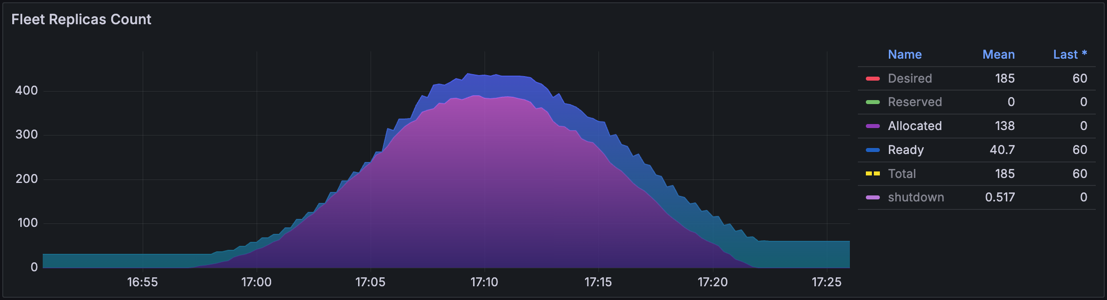
Buffer size value
The Buffer Size is the number of Ready game servers. Even when no players are playing, these game servers are running and waiting for players to join.
There is no recommended default, as it depends on multiple factors specific to each game.
Important factors to determine the Buffer Size:
Game server startup time:
Quicker startup times reduce the need for a large Buffer Size.
Game session duration:
Shorter game sessions increase the churn of players leaving and joining new game sessions, increasing the need for a larger Buffer Size.
Concurrent users (CCU):
More players increase the number of game servers that are
Allocatedat any given time, increasing the need for a larger Buffer Size.
The Buffer Size should be derived from the experience made with Proof of Concepts, Load Tests or Development environments, where the game server startup time, average game session duration, and average CCU are known or can be estimated accurately. Let's approach the problem to find the right value with an example.
Buffer Size Example
Example
The following assumptions are made for a Region Type:
- Average game server startup time is
30s, - Average game session lasts
10m, - Average CCU is
1500players, - Game type in that Region is 3on3 (
6players).
Intermediate conclusion:
250game servers areAllocated(1500/6).- Around 5% (
30s/10m) or ~12.5game servers must beReadyat any given time just to accommodate the current player base.
It is safe to assume doubling the calculated Buffer Size to 25 game servers is a good starting point to accommodate decent spikes in player count. If there is the expectation of steeper spikes, like in the evening or at the weekend, the Buffer Size can be increased further.
For this example, without further information, the recommended Buffer Size could be 25.
What happens if the Buffer Size is set too low?
Players have to wait for a game server to start up, leading to a poor player experience.
What happens if the Buffer Size is set too high?
Game servers are running idle, leading to unnecessary costs.
Recommendation
Frequently revisit and adjust the Minimum Replicas, Maximum Replicas, and Buffer Size settings to avoid unnecessary costs or poor player experience.
Minimum replicas
Minimum Replicas has two modes depending on whether it is set to 0 or a positive value.
Set to 0 (defer to buffer): When Minimum Replicas is 0, no static floor is enforced on total replicas. The autoscaler targets the Buffer Size as the number of Ready servers — it spins up new servers whenever the Ready count drops below the buffer. Total replicas at any given time reflect both Ready and Allocated servers combined, so the count rises above the buffer as demand grows and falls back as servers shut down. Use this mode when you want the buffer alone to drive ready capacity and have no requirement to keep a fixed number of servers running at all times.
Set to a positive value (static floor): When Minimum Replicas is greater than 0, GameFabric keeps at least that many game servers running in any state at all times — regardless of whether they are Ready, Allocated, or Unhealthy. The value must be at least as large as the Buffer Size and no larger than Maximum Replicas.
The recommended default is 0: let the buffer drive ready capacity without adding a separate static floor. Use a non-zero value only when you have a specific reason to guarantee a minimum number of servers running regardless of demand — for example, pre-warming capacity ahead of a launch. Review and lower the value once the peak has subsided to avoid unnecessary costs.
Maximum replicas
When looking from a resource perspective, the Maximum Replicas can be estimated by the available resources on the Location associated with the Region Type, divided by the Resource Requests of the game server. A Location can hold multiple different Armadas, each with different Resource Request settings.
Important factors to determine the Maximum Replicas:
Available resources:
The total CPU and Memory available on the Locations associated with the Region Type define the technical limit for the Maximum Replicas.
Game server Resource Requests:
The requested CPU and Memory consumption of (eventually many different) game servers define how many game servers can be run on the available resources.
Distribution of game server demand:
Different Armadas may have different demand patterns. An open world game mode requires more resources than a town server that only handles social interactions, but both may end up on the same Locations.
Overcommitment strategy:
Not all game servers are
Allocatedat the same time, some stayReadyfor a while. Intentional overcommitment is generally recommended to improve overall utilization. The challenge is managing allocations when multiple Armadas share the same underlying resources.
Let's approach the problem to find the right value with an example.
Maximum Replicas Example
INFO
The following assumptions are made:
- Two Locations (
2) are associated with the Region Type - Each Location has
64CPU cores and128Giof RAM available for game servers. - Each game server
Arequests4CPU cores and6Giof RAM. - Each game server
Brequests8CPU cores and8Giof RAM.
Intermediate conclusion:
- CPU-wise
32game serversA(2*64/4) fit into these Locations, - Memory-wise
42game serversA(2*128/6), - CPU-wise
16game serversB(2*64/8), - Memory-wise
32game serversB(2*128/8).
If expected demand is 20% for A and 80% for B, overcommitment can be applied by allocating 25% of the shared resources to A and 85% to B. While neither is expected to consistently reach its configured maximum, this approach provides enough flexibility for each Armada to take advantage of unused capacity and better match real, observed demand. As we choose the lower number of game servers that fit for CPU or Memory, the math then is 32 * 0.25 = 8 for A and 16 * 0.85 = ~13.6 for B.
For this example, without further information, the recommended Maximum Replicas for A could be 8, and for B could be 14.
What happens if the Maximum Replicas is set too low?
Resources are wasted. Nodes in these Locations may have available resources, but no new game servers are started because the Maximum Replicas limit has been reached.
What happens if the Maximum Replicas is set too high?
The Compute Resource Request setting for the Armada always applies, so the game server has guaranteed resources, or is not scheduled to the Location at all. To avoid degraded performance with reduced CPU availability, or OOMKills when memory is overcommitted, see Resource Limits.
WARNING
The Maximum Replicas is not only a consideration of physical resources, but also financial protection. Whether through player peaks, due to bugs or DDoS attacks, always choose a limit that is within your budget, especially on cloud.
Dynamically configuring the buffer size
The Buffer Size can be set to a fixed value as previously explained, or it can be dynamically adjusted based on the current player demand using the Dynamic Buffer option.
When dynamic mode is enabled, GameFabric adjusts Buffer Size at two levels. First, it updates the baseline Buffer Size for each region type based on overall demand trends. Then, for each Site, it applies an additional local adjustment using site-specific signals such as Ready and Allocated game server counts, startup time, and player demand. This allows for a more responsive and cost-effective approach to managing the Buffer Size, as it can automatically scale up or down based on the current trends.
INFO
Dynamic Buffer needs at least 24 hours of allocation data to determine a suitable Buffer Size, and it can take up to 48 hours to stabilize on a good Buffer Size after being enabled. During this time, it is recommended to closely monitor the behavior of the Buffer Size and its impact on player experience and costs, and adjust the configuration as needed.
It is expected that smaller player numbers (<50 CCU) cause more fluctuations in the Buffer Size, as there is less data to base the adjustments on, and each allocation has a bigger impact on the overall numbers.
WARNING
Dynamic Buffer is currently in Beta and should be used with caution. Make sure to monitor the behavior of the Buffer Size and its impact on player experience and costs, and adjust the configuration as needed.
Enabling dynamic buffer
To enable the Dynamic Buffer, toggle the Dynamic Buffer option on a Region - Type. You will be asked to confirm that you understand the implications of enabling this feature.
Once enabled GameFabric starts to control the Buffer Size, and any manual adjustments to the Buffer Size are be overridden by GameFabric's adjustments based on player demand. Minimum and Maximum Replicas settings will still apply, and can still be adjusted.
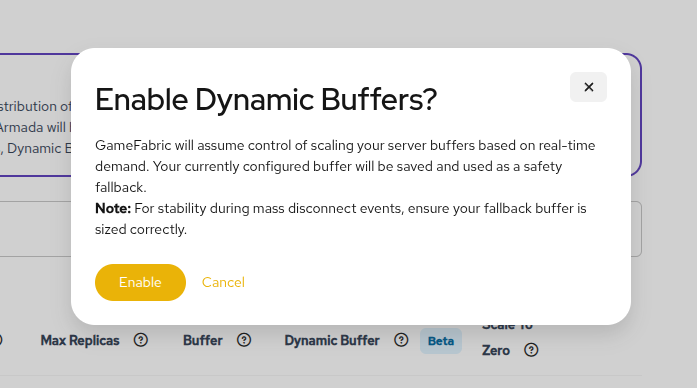
Configuring dynamic buffer
Once the Dynamic Buffer has been enabled, it can be configured using the slider.
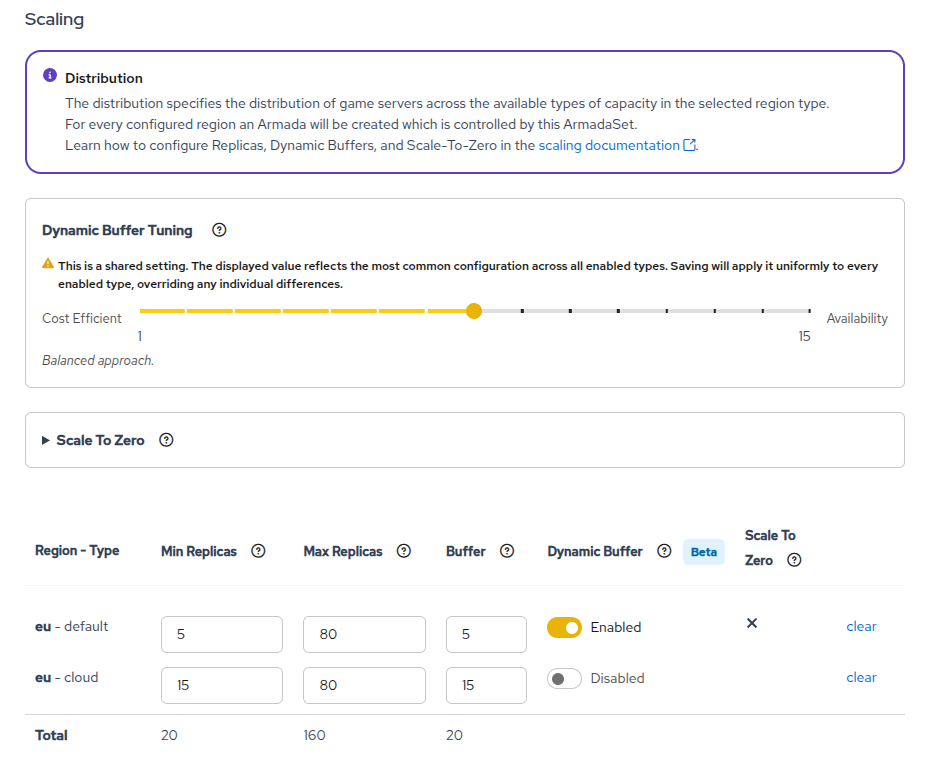
The slider configures the cost-efficiency of the Buffer Size adjustments, with a more cost-efficient setting leading to fewer idle game servers in the Ready state, and a more availability-focused setting leading to more game servers in the Ready state.
The slider configuration can generally be categorized as follows:
- Cost-Efficient (1-3): The number of
Readygame servers is kept to a minimum and scaling up happens more slowly which can result in game servers not being available during allocation peaks. - Balanced (4-11): A balance between cost and availability is maintained, with a moderate approach to scaling game servers.
- Availability-Focused (12-15): The number of
Readygame servers is increased to ensure availability during allocation peaks, with faster scaling up of game servers.
INFO
The Buffer Size calculated can be constrained by the Minimum Replicas. If this is observed, it is recommended to increase the Minimum Replicas to allow for a larger Buffer Size.
It is suggested that a more availability-focused setting be used at first to ensure a good player experience. Once the behavior of the Dynamic Buffer is well understood, and the impact on player experience and costs has been monitored, the setting can be adjusted towards a more cost-efficient configuration if desired.
To disable the Dynamic Buffer, simply toggle the Dynamic Buffer option off. This stops any further adjustments to the Buffer Size, but it does not reset the Buffer Size to a specific value to ensure continuity of player experience. If desired, a new Buffer Size can be set after disabling the Dynamic Buffer.
Mass disconnects
In the case of a mass disconnect scenario, for example due to a DDoS attack or hardware outage, GameFabric interprets this as a decrease in demand and scale down the Buffer Size, which can lead to a poor player experience for the remaining players trying to get into a game session.
Values behind the slider
Slider values
When using the slider to configure the Dynamic Buffer, the following values are applied, starting at the most cost-efficient setting (1) to the most availability-focused setting (15):
| Slider Value | Max Buffer Utilization | Dynamic Max Buffer Threshold | Dynamic Min Buffer Threshold |
|---|---|---|---|
| 1 | 80% | 100% | 50% |
| 2 | 75% | 107% | 47% |
| 3 | 70% | 114% | 44% |
| 4 | 65% | 121% | 41% |
| 5 | 60% | 129% | 39% |
| 6 | 55% | 136% | 36% |
| 7 | 50% | 143% | 33% |
| 8 | 45% | 200% | 30% |
| 9 | 40% | 257% | 27% |
| 10 | 35% | 264% | 24% |
| 11 | 30% | 271% | 21% |
| 12 | 25% | 279% | 19% |
| 13 | 20% | 286% | 16% |
| 14 | 15% | 293% | 13% |
| 15 | 10% | 300% | 10% |
These values can be used when configuring the Dynamic Buffer through the API or Terraform, or custom values can be selected to specifically tune its behavior.
Scaling down
To gracefully scale down a Region Type, the Minimum Replicas, the Maximum Replicas, and the Buffer Size can be set to zero. Game servers that are Allocated continue to run until they are Shutdown, but new game servers are no longer being scheduled.